The Terminal Is No Longer Just a Shell: Inside the Architecture of Herdr and Fresh
Over the past year, running autonomous coding agents on a local workstation stopped being an occasional experiment and became my default way of writing software. On any given Tuesday, I might have Hermes refactoring a database client, Claude Code running an extensive test suite in a git worktree, and OpenCode generating integration tests.
Very quickly, this workflow collided with an old boundary: the traditional terminal emulator.
Standard terminal emulators like Windows Terminal, iTerm2, or Alacritty were designed around a single human typing into a single shell. When you delegate tasks to autonomous coding agents, that model falls apart. You cannot tell at a glance which agent finished its run, which one crashed, or which one is stuck waiting for an API key or an interactive confirmation. If an agent wants to point you to five files it just changed, it dumps a wall of paths into stdout, leaving you to copy-paste each path into an editor.
Two new Rust-based projects have emerged with radically different answers to this problem:
- Herdr (
herdr.dev): A terminal multiplexer and background process supervisor designed specifically as a habitat for autonomous coding agents. - Fresh (
getfresh.dev): A modern, zero-config terminal text editor and IDE designed to give humans a VS Code-grade editing experience inside the terminal.
Both treat the terminal not as a dumb character grid, but as an application runtime. Yet they approach this runtime from opposite directions. Here is what I learned after stress-testing both architectures, inspecting their source designs across 13 engineering dimensions, and hooking an external agent directly into Fresh over Windows Named Pipes.
1. Two Divergent Answers to the Same Problem
When you inspect the documentation and design philosophies of Herdr and Fresh, the contrast is immediate:
┌──────────────────────────────────────────────┐
│ THE TERMINAL AS AN APP RUNTIME │
└──────────────────────┬───────────────────────┘
│
┌───────────────────────┴───────────────────────┐
▼ ▼
[ HERDR: THE HABITAT ] [ FRESH: THE WORKBENCH ]
Host Unit: The Process Host Unit: The Buffer
Primary Actor: The Agent Primary Actor: The Human
Core Goal: Process Orchestration Core Goal: Ergonomic Code Editing
"Run them anywhere. Leave them running." "Zero configuration. No learning curve."
Herdr: The Habitat for Agents
Herdr positions itself as a specialized terminal multiplexer. It assumes your workstation is populated by a "herd" of independent agents running in parallel.
- Mental Model: A background daemon that owns PTY lifecycles, coupled with detachable terminal UI clients. If you close your laptop or exit the terminal client, the daemon and all child processes keep running.
- Primary Unit: The Process (hosted in a genuine terminal pane).
- Core Abstraction: An Agent. Herdr treats agents as first-class citizens, tracking them through an explicit five-state machine:
working,blocked,done,idle, orunknown. - Commercial Backing: Backed by a $6M venture seed round, with an active cloud waitlist.
Fresh: The Workbench for Humans
Fresh takes the opposing view: the human engineer still needs a clean, highly responsive editing environment inside the terminal without fighting through complex Neovim configurations.
- Mental Model: A modern terminal editor built on
crosstermandratatui, bringing VS Code conventions (multi-cursor, command palette viaCtrl+P, native mouse drag-and-drop, interactive settings) directly into a terminal buffer. - Primary Unit: The Document Buffer (backed by a high-performance piece tree and interval trees for text spans).
- Extensibility: An embedded TypeScript runtime powered by QuickJS and
oxc, replacing bloated V8 dependencies. - Open Source Foundation: Pure indie open source licensed under GPL-3.0-or-later, created by Noam Lewis.
2. Architectural Comparison Across 13 Dimensions
To evaluate both tools without getting bogged down in superficial feature checklists, I analyzed them across 13 architectural meta-dimensions.
| # | Meta-Dimension | Herdr | Fresh |
|---|---|---|---|
| 01 | Core Positioning | Agent runtime & multiplexer | Terminal text editor & IDE |
| 02 | Concurrency Model | Server owns PTYs; clients attach/detach; ConPTY on Windows | Tokio async tasks + dedicated QuickJS plugin thread |
| 03 | Conceptual Primitive | Pane (OS terminal process) | Buffer + View (decoupled piece-tree document) |
| 04 | Agent Representation | First-class entity with 5-state lifecycle engine | Ordinary process grouped inside Orchestrator worktrees |
| 05 | Automation API | Socket/Named Pipe CLI (herdr agent prompt, wait-output) |
fresh --cmd script run (TypeScript) + daemon open-file |
| 06 | Persistence | Process survival: client detach, reboot snapshots, session resume | Buffer survival: daemon mode (fresh -a), hot exit, state restore |
| 07 | Remote Topology | Machine aggregation (local UI renders remote SSH panes) | Remote file tunneling (ssh://, Python 3 backend, devcontainers) |
| 08 | Extension Engine | Polyglot binary plugins (herdr-plugin.toml) |
TypeScript running on embedded QuickJS (rquickjs + oxc) |
| 09 | Plugin Sandbox | No sandbox (runs with host user privileges) | Sandboxed QuickJS runtime with Workspace Trust validation |
| 10 | Configuration & UX | TOML config, prefix key (Ctrl+B), mouse-native sidebar |
JSON config (config.json), modeless keys, GUI palette |
| 11 | Distribution | Shell/PowerShell installer scripts, Nix, Homebrew | Self-updating static musl binary, winget, cargo, distro repos |
| 12 | Governance | Commercial startup ($6M seed round, cloud service) | Indie open source (Noam Lewis, GPL-3.0-or-later) |
| 13 | Current Maturity | Rapid release velocity (≥v0.7), production Windows GA | Version 0.3.x; stable editor core, plugin API ~61% complete |
Mapping the Conceptual Vocabularies
When you map the naming schemes of both projects side by side, their conceptual overlap becomes clear:
HERDR PRIMITIVE FRESH PRIMITIVE
┌────────────────────┐ ┌────────────────────┐
│ Workspace │ ◄───────────► │ Workspace / Window │
├────────────────────┤ ├────────────────────┤
│ Tab (View) │ ◄───────────► │ Split / Tab │
├────────────────────┤ ├────────────────────┤
│ Pane (PTY) │ ◄───────────► │ Buffer + View │
├────────────────────┤ ├────────────────────┤
│ Session (Server) │ ◄───────────► │ Daemon (Server) │
├────────────────────┤ ├────────────────────┤
│ Agent (1st Class) │ ◄───────────► │ (None / Process) │
└────────────────────┘ └────────────────────┘
Translate Pane to Split and Session to Daemon, and the structural skeletons align. The primary architectural dividing line is Herdr's Agent abstraction: Herdr knows what an agent is, parses its terminal states, and raises a flag when an agent is blocked. Fresh treats an agent as a terminal process that happens to be running inside a split view or an Orchestrator worktree.
3. The Live Walkthrough: Driving Fresh from an External Agent
While Herdr excels at managing clusters of processes, Fresh provides an editor surface. In an agent-driven development loop, one of the most frustrating bottlenecks is the communication barrier between the agent and the human reviewer:
The "Walkie-Talkie vs. TV Control Room" Problem
- The Traditional Subshell (Walkie-Talkie):
When an external agent (such as Hermes or an autonomous CLI) runs a command using tools likerun_commandor bash, the command executes in an isolated child process with redirectedstdoutandstderr. The agent is blind to what the developer is currently looking at. It cannot move the user's cursor, open relevant files, or highlight a diff. It talks over a walkie-talkie. - Fresh Daemon Architecture (TV Control Room with a Mail Slot):
When Fresh runs in daemon mode (fresh -aor via its background session), it behaves like an interactive control room. It continuously writes rendered terminal buffers to disk and opens a Windows Named Pipe (\\.\pipe\fresh-<SESSION>.ctrl) listening for framed JSON-RPC requests.
The Security Capability Gate
Fresh contains an internal TypeScript scripting engine (fresh --cmd script run) that exposes 366 editor methods. However, evaluating arbitrary scripts requires a capability token ($FRESH_CMD_TOKEN). If an external shell or unauthenticated agent attempts to invoke fresh --cmd script run, Fresh blocks the call:
Error: no capability token: script evaluation is not authorized
This prevents rogue scripts or unauthorized background tasks from executing code within the user's editor session.
However, Fresh provides an intentional, unauthenticated channel: fresh --cmd daemon open-file. This command requires no capability token. Any external process, script, or AI agent can use this entry point to open files, target specific line ranges, and render inline Markdown annotations directly on the user's screen.
In our practical testing, search and code review tasks fall into two distinct structural shapes. We implemented and verified dedicated routing patterns for each.
Code Search Yields Hits
│
Are hits in 1 file or across multiple files?
/ \
Across Multiple/ \ Multiple Hits in 1 File
▼ ▼
[ CASE 1 ] [ CASE 2 ]
daemon open-file .fresh-tour.json
Multi-Tab Push Guided Code Tour
Case 1: Batch Multi-Tab Push Across Multiple Files
The Challenge
An engineer asks the agent to investigate a cross-cutting subsystem (for example, how hybrid retrieval is configured and consumed). The relevant lines span three to five distinct files: configuration files, core modules, and architecture decisions.
If the agent opens these files sequentially with pauses or asks the user to inspect each one manually, the interaction feels slow and clunky.
The Technical Solution
The agent executes a single batch daemon open-file command targeting all candidate files simultaneously.
Operational Rule: Never pass
--waitby default in automated workflows. Passing--waitforces the calling agent to block indefinitely until the user closes each tab or pressesEsc.
fresh.exe --cmd daemon open-file default `
'AGENTS.md:70-92@"**Workspace Rules**\nMemPalace v2 hybrid retrieval mandate."' `
'pyproject.toml:35-45@"**Dependency Pin**\nGit revision pinning for mempalace."' `
'wiki/mempalace-v2-hybrid-retrieval.md:1-30@"**Architecture**\nThree-layer hybrid retrieval concept."' `
'docs/decisions/ADR-009-sqlite-hybrid-retrieval-for-mempalace.md:20-50@"**Decision Record**\nSQLite migration decision."'
What Happens on Screen
- The external agent finishes its search and prints a concise summary in its own terminal tab.
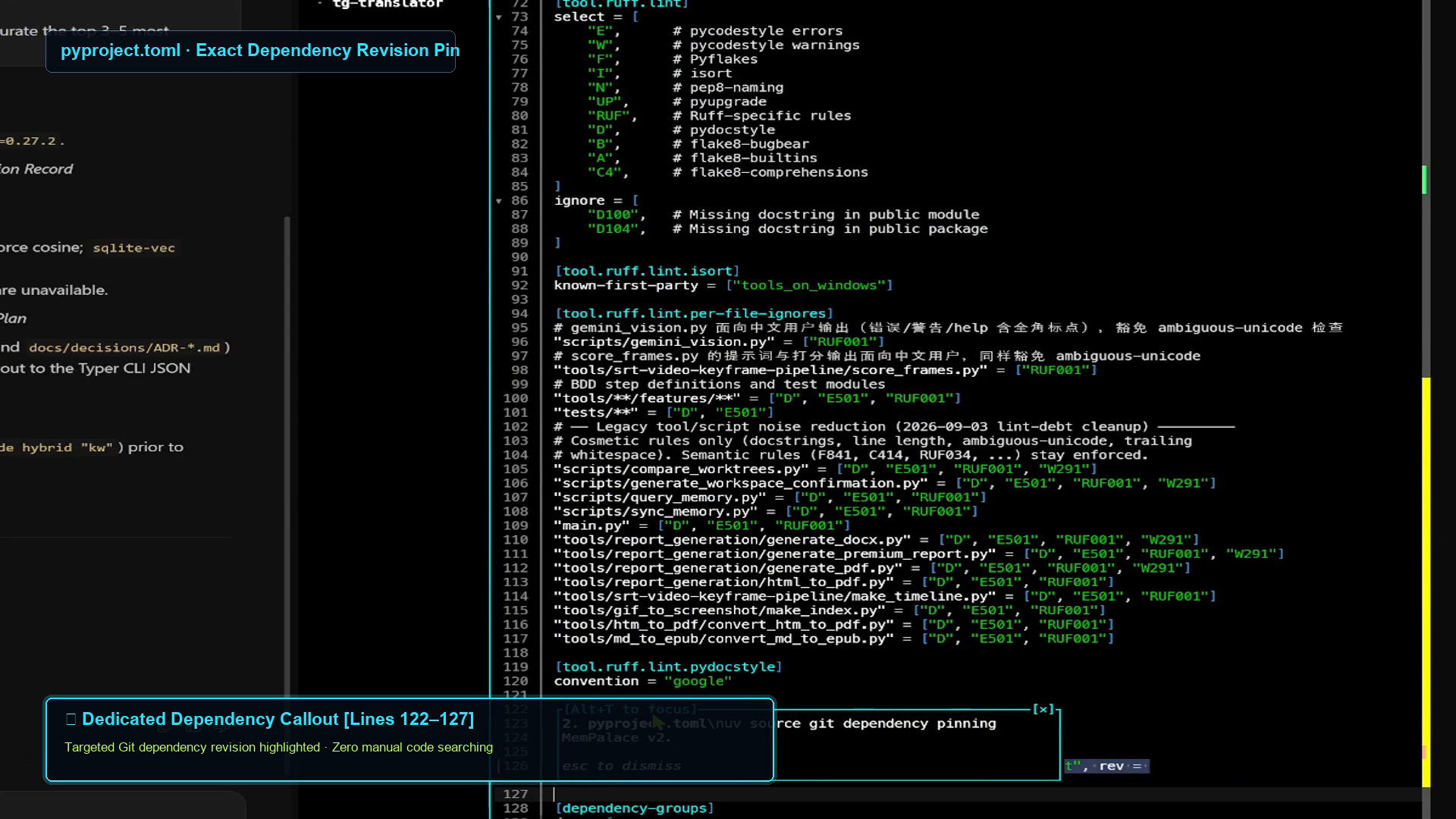
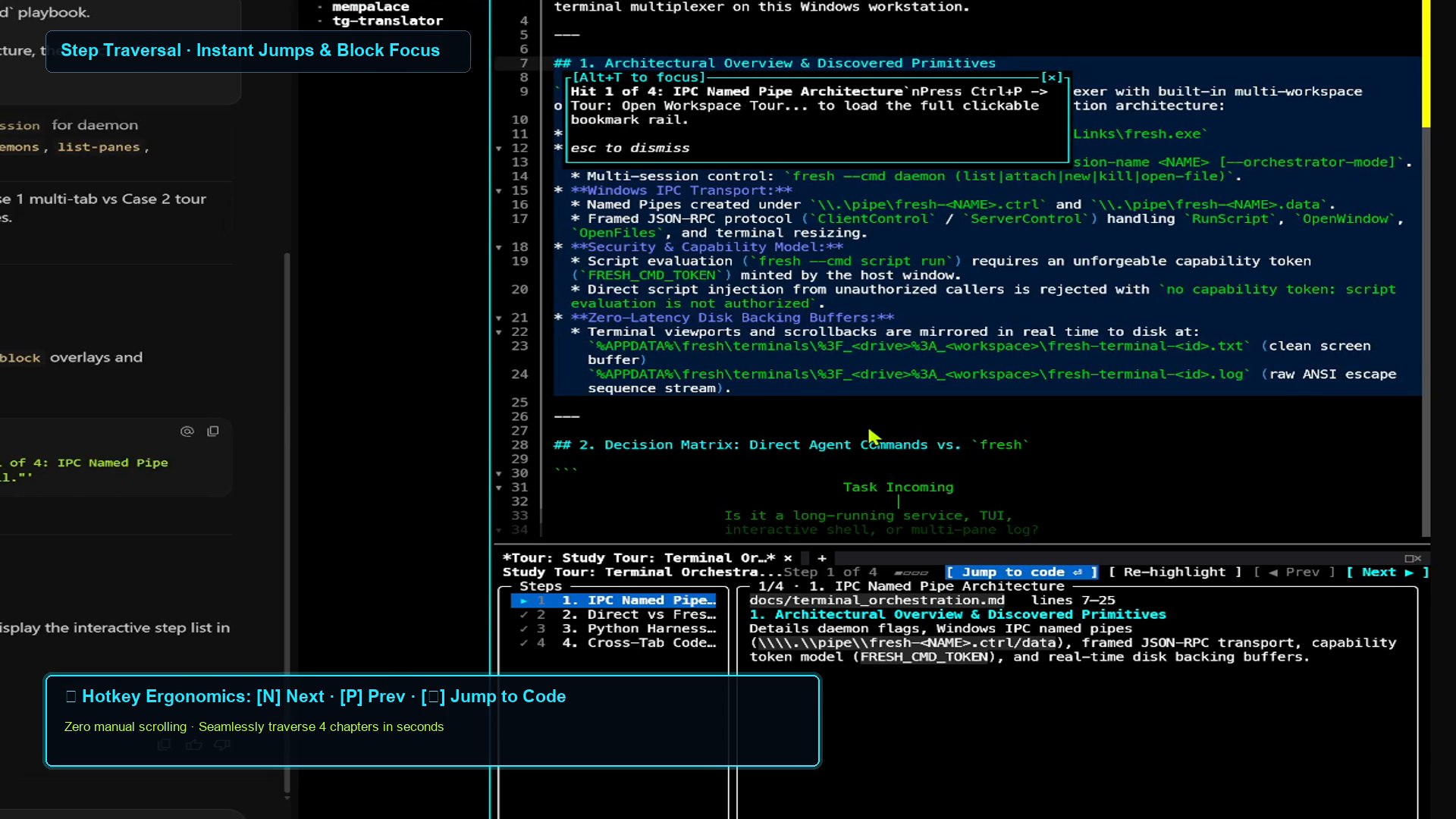
- In the adjacent Fresh window, four tabs open simultaneously.
- Each tab automatically scrolls to the specified line span (
70-92,35-45, etc.), visually highlights the code block, and renders an inline Markdown callout card (@"...") explaining the significance of that block. - The engineer reviews the code with zero copy-pasting and zero context switching.
Case 2: Deep Dive in a Single File via Guided Code Tour
The Challenge
The engineer asks the agent to explain a single, long architectural playbook or implementation file (for example, docs/terminal_orchestration.md, a 300-line specification). The search yields four critical sections within that one file.
This creates a mechanical problem: a text editor buffer has only one active scroll position at any given moment.
- If the agent passes four line ranges for the same file in a single batch command, the buffer jumps straight to the fourth location. The user misses sections 1, 2, and 3.
- If the agent sends them one at a time with
--wait, the agent freezes waiting for user input on each step.
The Technical Solution: .fresh-tour.json
Fresh includes a built-in Code Tour engine. Instead of hammering the buffer with conflicting cursor positions, the agent writes a transient .fresh-tour.json manifest at the workspace root, opens the first step using daemon open-file, and alerts the user to open the tour rail.
Here is the exact manifest structure generated by the agent:
{
"title": "Terminal Orchestration Architecture Tour",
"description": "Guided walkthrough of docs/terminal_orchestration.md",
"schema_version": "1.0",
"steps": [
{
"step_id": 1,
"title": "IPC Architecture & Named Pipes",
"file_path": "docs/terminal_orchestration.md",
"lines": [7, 26],
"explanation": "## IPC Architecture\nDefines daemon lifecycle, named pipes (\\\\.\\pipe\\fresh-*.ctrl), and zero-latency disk backing buffers.",
"overlay_config": {
"type": "block",
"focus_mode": true
}
},
{
"step_id": 2,
"title": "Decision Matrix: Direct vs. Fresh",
"file_path": "docs/terminal_orchestration.md",
"lines": [28, 54],
"explanation": "## Decision Matrix\nWhen to route via direct subshell vs. when to use the `fresh` terminal multiplexer.",
"overlay_config": {
"type": "block",
"focus_mode": true
}
},
{
"step_id": 3,
"title": "Capability Security Boundary",
"file_path": "docs/terminal_orchestration.md",
"lines": [56, 85],
"explanation": "## Capability Boundary\nExplains why script evaluation requires `$FRESH_CMD_TOKEN` while `daemon open-file` remains open for agent integration.",
"overlay_config": {
"type": "block",
"focus_mode": true
}
}
]
}
Once written, the agent executes:
fresh.exe --cmd daemon open-file default 'docs/terminal_orchestration.md:7-26@"**Step 1 of 3: IPC Architecture**\nPress Ctrl+P and type \"Tour: Open Workspace Tour...\" to navigate."'
What Happens on Screen
- Fresh scrolls to Step 1 (
lines 7-26) and applies a block-focus overlay. - When the user opens the command palette (
Ctrl+P) and selects Tour: Open Workspace Tour..., Fresh displays a navigable bookmark sidebar. - The engineer steps through each milestone at their own pace using the keyboard, with full context preserved at every stop.
4. Practical Synthesis: When to Use What
After working extensively with both runtimes, the trade-offs are straightforward:
YOUR CORE NEED
│
┌───────────────────────────────┴───────────────────────────────┐
▼ ▼
[ Multi-Agent Supervision ] [ Interactive Terminal Editing ]
- Running 5–20 autonomous agents - You need LSP, jump-to-definition, multi-cursor
- Need macro dashboard of who is blocked - Reviewing git diffs and navigating ASTs
- Detached background persistence across reboots - Agent needs to project code onto your screen
- Mobile/remote terminal aggregation - Clean, single-binary portable environment
│ │
▼ ▼
USE HERDR USE FRESH
The Recommended Hybrid Stack
You do not need to treat Herdr and Fresh as mutually exclusive competitors. They occupy different layers of the developer toolchain:
- Herdr as the Outer Layer: Run Herdr as your workstation's background runtime. It hosts your agent swarms, isolates their processes into manageable workspaces, and rolls up their health states (
working,blocked,done) into a clear sidebar. - Fresh as the Inner Layer: Open Fresh inside a Herdr pane when you need to inspect code, edit configurations, or let an agent drive an interactive review session.
By combining them, you get an observable agent habitat without giving up a fast, modern terminal editor.
5. Retrospective
Moving from basic subshells to structured terminal runtimes changes how you collaborate with AI agents.
When an agent is restricted to an isolated stdout stream, every code review involves manual friction: reading line numbers, switching windows, finding files, and scanning for context. When the terminal provides a structured IPC channel, the agent stops acting like an external script and starts acting like an active collaborator at the desk next to you: opening relevant files, highlighting exact line ranges, and structuring walkthroughs.
Whether you need Herdr's process multiplexing or Fresh's editor control room, the takeaway is clear: the terminal is no longer just a place to run bash. It has become the operating environment for the next generation of software tools.